How to deploy a static website using Google Compute Engine
GCE in Action

In this I’ll be covering, how to create static websites on Google Cloud.
One of the great things about being an engineer, is that we get to have complete control over so many aspects of the things we develop. And for a lot of you out there, this extends to the websites you develop, too. If you need something more advanced than a static site, but need more control than what Google Cloud managed services offer then, you can use Compute engine.
What you’ll learn
- Create a website using Compute Engine in five simple steps.
Prerequisites
- Basic concepts and constructs of Google Cloud so you can recognize the names of the products.
- This picture (by Greg Wilson) is a good place to start and learn about all the products in less than four words:

What is Google Compute Engine?
Google Compute Engine lets you create and run virtual machines on Google infrastructure. Compute Engine offers scale, performance, and value that allows you to easily launch large compute clusters on Google’s infrastructure. There are no upfront investments and you can run thousands of virtual CPUs on a system that has been designed to be fast, and to offer strong consistency of performance.
How to create website on Compute Engine !
It is important to note that a well-designed web application should scale seamlessly as demand increases and decreases, and be able to withstand the loss of one or more compute resources.
But, a truly resilient and scalable web application requires planning. Let’s see how a website works, using Google Compute Engine. Stay tuned for a codelab! (coming soon)
Step 1 : User Request and DNS
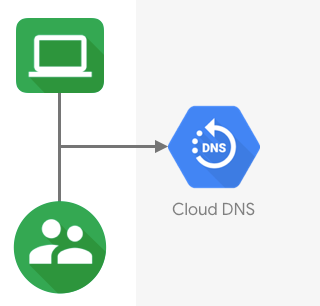
User request lands on Cloud DNS
When a user requests your website in the browser, their request ends up on your DNS provider, in this example, we are using Google DNS which is a highly available Domain Name service.
The Network traffic is routed to infrastructure running on Google Cloud.
If you use your own DNS provider, then the request will land there first, and then the DNS provider routes the traffic to Google Cloud.
Step 2 : Cached vs Non-cached content

Cached vs non-cached content
Then, if the request is for content that is cached, it is delivered by CDN. In this architecture, we are using Cloud CDN, a global network of edge locations. Requests are automatically routed to the nearest edge location, so content is delivered with the best performance. (You can integrate with any other third party CDN of your choice as well.)
Static content used by the web application is stored on Google Cloud Storage, which is a highly durable storage infrastructure designed for mission-critical and primary data storage.

Request load balancing done by cloud load balancing
Step 3 : Request Load Balancing
HTTP requests are first handled by Cloud Load Balancing, which automatically distributes incoming application traffic among multiple Compute Engine instances.
If you use HTTPS, the SSL session is terminated at the load balancer and requires at least one signed SSL certificate.
Step 4 : Web and Application servers
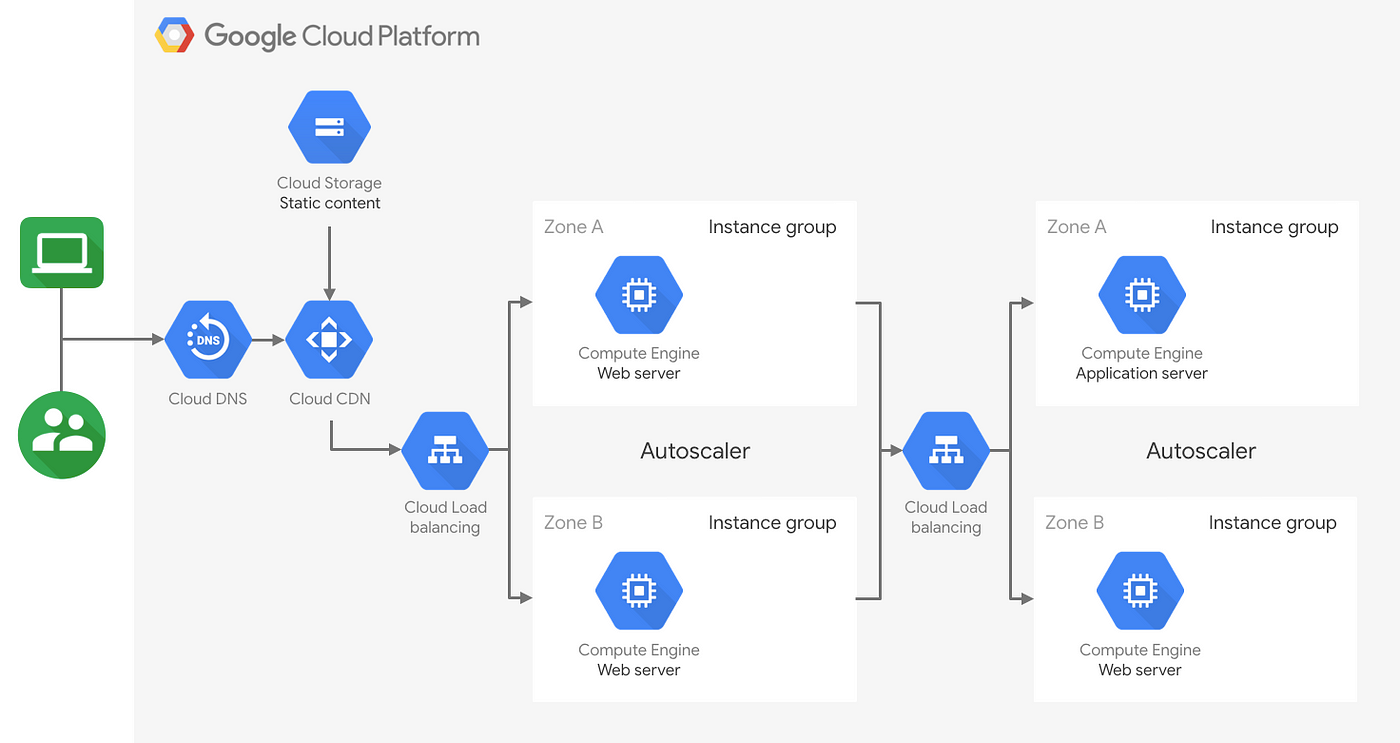
Google Compute Engine instances autoscaled to handle user requests for the web server
Web apps, including the application server and web server, are deployed on Google Compute Engine (GCE) instances. Deployment and scaling is done automatically and seamlessly by using instance templates. An instance template is a specific customized configuration of the GCE instance that facilitates the reuse of instance configurations by using managed instance groups.
Step 5: Store application data
To store application data, you would use a database. The relational database used in this example is Cloud SQL. Cloud SQL is a fully-managed database service that makes it easy to set up, maintain, manage, and administer your relational data in the cloud. It automates all the data backups, replication, patches, and updates.
Depending on the website use case you may want to use document based database like Datastore for user data or use Bigtable for large fully managed, highly scalable and global, NoSQL database.
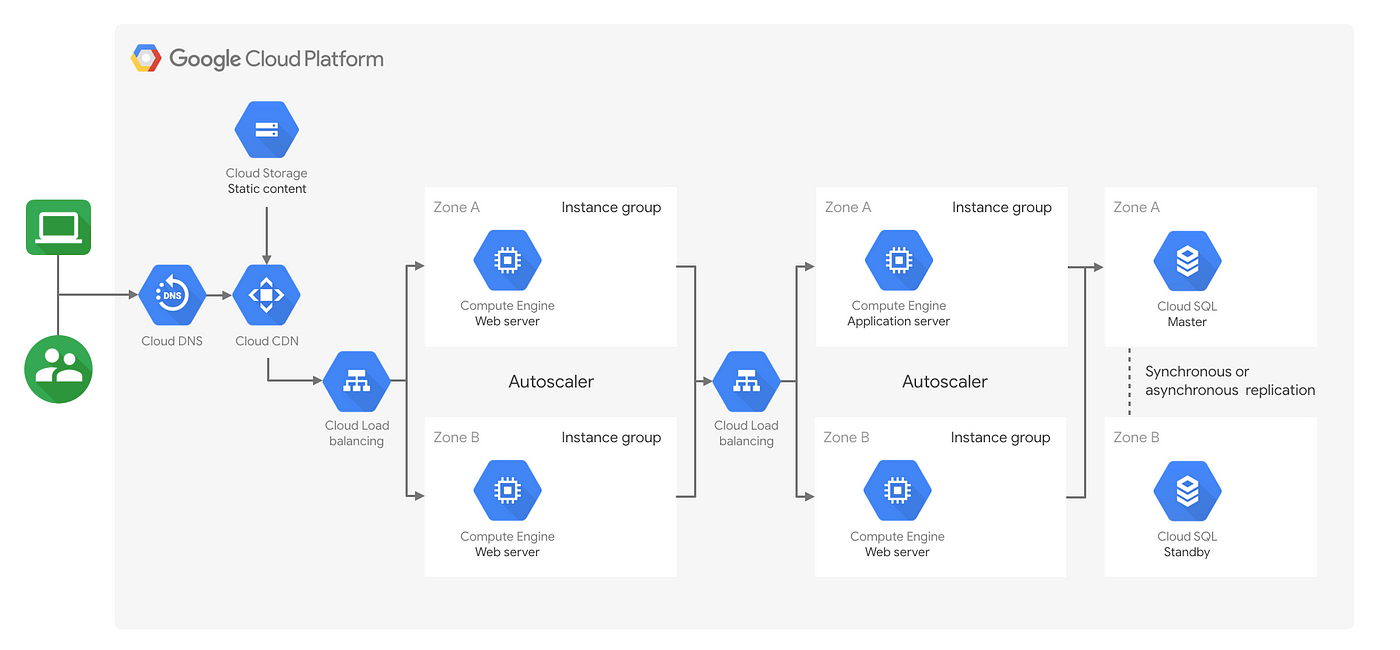
Architecture for hosting web applications on Google Compute Engine
Scaling Websites
Now that we know how the web application architecture is set up for Google Compute Engine, what happens if our website gets really popular and the traffic grows from 100s to millions of users? We need to make sure that our application can gracefully handle peaks and dips in traffic.
One way to increase capacity to handle peaks is to scale vertically, by adding more CPU and memory to the same instance. This means that Vertical scaling will be limited based on the capacity of a single machine and its size.
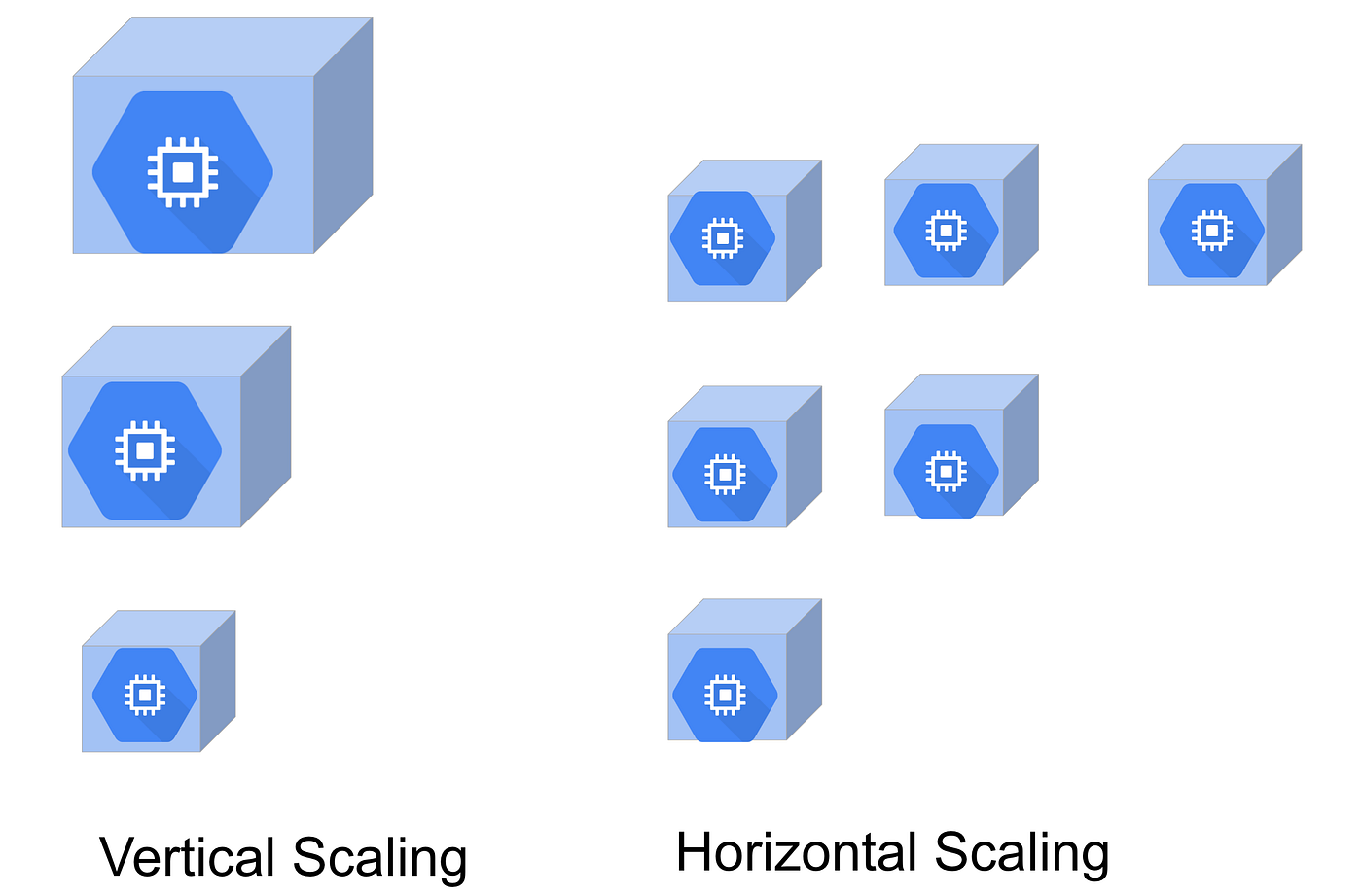
Horizontal and Vertical scaling
Horizontal scaling, on the other hand, is a better option for high-availability applications, because it allows you to scale the number of compute resources dynamically, as the demand increases.
The idea that the application’s resources can increase or decrease requires that it has a means by which we can add or remove instances from service.